
Preview
About
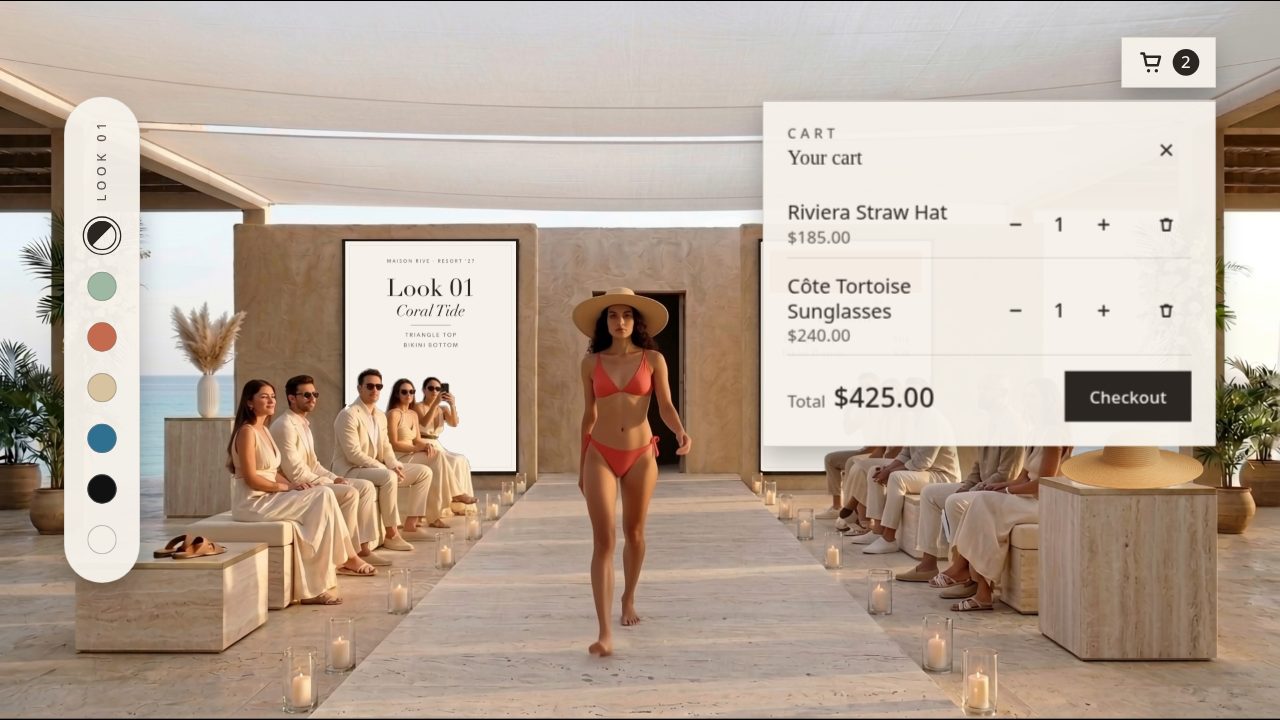
Cart lets viewers shop without leaving the video. Product cards with an Add to cart button put items in it; a badge in the top corner counts them, and a tap on the badge opens the cart beside the video while it keeps playing.
- What it does: keeps the cart (name, unit price, quantity), shows the total in the cart's currency formatted for the viewer, and hands the order to whoever takes the payment.
- Adding: the same product added twice is one line with quantity 2. A cart holds one currency: an item in another currency is refused with a short message ("This cart is in USD").
- Checkout on your site (the default): the cart pauses the video and tells your page with the Checkout event, carrying the order. Your page answers when it has taken over, finished or failed.
- Checkout through a payment plugin: set Checkout to Payment plugin and name the plugin; the cart calls its Pay action with the order and its own key, and the plugin answers with the cart's Checkout Result — no rules needed.
- Step 1: install Cart from the marketplace (Make interactive does this for you when the video has products with prices).
- Step 2: add one Cart overlay covering the whole timeline. It covers the whole frame and places its own badge and panel, so do not resize it.
- Step 3: send items to it: a rule on Product card's Add to cart event running the cart's Add Item action.
- Step 4: pick a theme and a size. Lean-back is for a TV across the room.
- How it behaves: the badge and the open panel are tappable while the video plays, and every tap anywhere else goes through to the video. A keyboard or TV remote reaches the badge with Tab.
- Variables: the cart keeps Cart items, Cart count (the number of items) and Cart total up to date for your rules and other plugins. Only the cart writes them.
- For power users: actions Add Item, Remove Item, Set Quantity, Clear, Open, Close and Checkout Result; events Item Added, Cart Changed, Checkout, Checkout Completed and Checkout Failed.
Settings
What a creator can set in the Studio, and what a host can set in its overrides.
Style
| Setting | Type | Default | What it does |
|---|---|---|---|
Fontfont | Text | - | A CSS font stack, e.g. "Georgia, serif". Use fonts the viewer's device already has; plugins cannot download fonts. Leave empty for the theme's own. |
Sizesize | One of | Normal | How large everything is, on top of scaling with the video. Lean-back is for a TV across the room. |
Themetheme | One of | Studio | The look. Pick the same theme on every family plugin in a video and they read as one set. |
Accent colouraccent | Colour | - | Buttons, highlights and the focus ring, as #rrggbb (or #rgb, rgb(), rgba()). Leave empty for the theme's own. The text on it is picked for you so it stays readable. |
Motionmotion | One of | Full | How things appear and move. A viewer who has asked their device for reduced motion always gets at most Reduced. |
Corner roundingradius | Number, 0 to 200 | - | Corner radius of panels and cards, in pixels of a 1920-wide frame. Leave empty for the theme's own. |
Background coloursurface | Colour | - | The panels' background, as #rrggbb (or #rgb, rgb(), rgba() for see-through). Leave empty for the theme's own. If the theme's text would not read on it, a readable one is used. |
Text colourtextColor | Colour | - | As #rrggbb (or #rgb, rgb(), rgba()). Leave empty for the theme's own (or the readable one picked for your background colour). |
Behavior
| Setting | Type | Default | What it does |
|---|---|---|---|
Checkoutcheckout | One of | Your site | Who takes the payment. Your site: the cart emits Checkout with the order and your page answers with Checkout Result. Payment plugin: the cart calls that plugin's Pay action. |
Payment plugincheckoutPlugin | Text | - | The payment plugin's key (namespace:identifier) when Checkout is Payment plugin. It must offer a Pay action taking { order, replyTo } and answer with callAction(replyTo, 'checkoutResult', { orderId, status, message? }). |
Content
| Setting | Type | Default | What it does |
|---|---|---|---|
Currencycurrency | Text | - | The cart's currency, as a three-letter code (USD, EUR, GBP…). Items in another currency are refused. Empty: the first item's currency (Make interactive sets it from the products). |
Layout
| Setting | Type | Default | What it does |
|---|---|---|---|
Show the badge when emptyshowEmpty | On or off | Off | Off: the badge appears with the first item. |
Events and actions
Events you can react to
| Event | When it is sent | Data |
|---|---|---|
Checkoutplugin:mp4e:cart:checkout | The viewer checked out and Checkout is Your site: the order is the site's to take. Answer with the Checkout Result action. |
|
Item Addedplugin:mp4e:cart:itemAdded | An item went into the cart (a new line, or one more of a line already there). |
|
Cart Changedplugin:mp4e:cart:cartChanged | The cart's lines changed (an add, a quantity, a removal, a clear, a completed checkout). |
|
Checkout Failedplugin:mp4e:cart:checkoutFailed | The payment did not go through, or the payment plugin could not start it; the cart is kept. |
|
Checkout Completedplugin:mp4e:cart:checkoutCompleted | The payment went through (Checkout Result completed); the cart is now empty. |
|
Actions a rule or the host can call
| Action | What it does | Its settings |
|---|---|---|
Add ItemaddItem | Put an item in the cart. The same objectId (else the same name) and variant adds to its line. An item in another currency than the cart's is refused with a short message. |
|
Remove ItemremoveItem | Remove a line. |
|
Set QuantitysetQuantity | Set a line's quantity; 0 or less removes it. |
|
Clearclear | Empty the cart. | - |
Openopen | Open the cart panel (the video keeps playing). | - |
Closeclose | Close the cart panel. | - |
Checkout ResultcheckoutResult | The answer to a checkout, from the site or a payment plugin: handled (the site took over — the panel closes), completed (thanks, the cart empties) or failed (the message is shown, the cart is kept). Only the pending order's id is accepted. |
|
Variables it provides
| Variable | What it holds | Type and default |
|---|---|---|
Cart items{{mp4e:cart:items}} | The cart's lines: [{ key, objectId?, name, price, currency, quantity, variant? }]. Written by the Cart only. | listRead only |
Cart count{{mp4e:cart:count}} | The number of items in the cart (the total quantity). Written by the Cart only. | numberStarts as 0Read only |
Cart total{{mp4e:cart:total}} | The cart's total, in the cart's currency. Written by the Cart only. | numberStarts as 0Read only |
What it can reach
This plugin asks for nothing: no network, no reading of the video's analysis, no say over what plays.
Versions
- v1.2.5November 28, 2026Current
What changed
1.2.5: variables say readOnly instead of the older editable flag; built with family kit 1.4.0, which adds a helper the cart does not use. 1.2.4: a closed cart formats no price, so it costs nothing at start-up. 1.2.3: prices format faster on slow devices (one formatter per currency and locale, not one per price). 1.2.2: an open surface keeps a remote until Back closes it, and a remote leaves the rest at the edge (kit 1.3.1). A remote opening the panel lands on Checkout, not the close button, and Checkout hiding hands focus to Cancel checkout. 1.2.0: the Atelier theme (kit 1.3.0). 1.1.1: a variant's option names and its colour id and name are capped at 60 characters, like its values. 1.1.0: lines carry a variant (colour and options); the same product in two variants is two lines. 1.0.1: the thanks line shows the order code once ("Thanks — order 1a2b…", not "order order_…"). 1.0.0: first release — an in-video shopping cart in the family design system's five themes and three sizes, with checkout on the host site or through a payment plugin.
- v1.2.4November 6, 2026
What changed
1.2.4: a closed cart formats no price, so it costs nothing at start-up. 1.2.3: prices format faster on slow devices (one formatter per currency and locale, not one per price). 1.2.2: an open surface keeps a remote until Back closes it, and a remote leaves the rest at the edge (kit 1.3.1). A remote opening the panel lands on Checkout, not the close button, and Checkout hiding hands focus to Cancel checkout. 1.2.0: the Atelier theme (kit 1.3.0). 1.1.1: a variant's option names and its colour id and name are capped at 60 characters, like its values. 1.1.0: lines carry a variant (colour and options); the same product in two variants is two lines. 1.0.1: the thanks line shows the order code once ("Thanks — order 1a2b…", not "order order_…"). 1.0.0: first release — an in-video shopping cart in the family design system's five themes and three sizes, with checkout on the host site or through a payment plugin.
- v1.2.3November 6, 2026
What changed
1.2.3: prices format faster on slow devices (one formatter per currency and locale, not one per price). 1.2.2: an open surface keeps a remote until Back closes it, and a remote leaves the rest at the edge (kit 1.3.1). A remote opening the panel lands on Checkout, not the close button, and Checkout hiding hands focus to Cancel checkout. 1.2.0: the Atelier theme (kit 1.3.0). 1.1.1: a variant's option names and its colour id and name are capped at 60 characters, like its values. 1.1.0: lines carry a variant (colour and options); the same product in two variants is two lines. 1.0.1: the thanks line shows the order code once ("Thanks — order 1a2b…", not "order order_…"). 1.0.0: first release — an in-video shopping cart in the family design system's five themes and three sizes, with checkout on the host site or through a payment plugin.
- v1.2.2November 4, 2026
What changed
1.2.2: an open surface keeps a remote until Back closes it, and a remote leaves the rest at the edge (kit 1.3.1). A remote opening the panel lands on Checkout, not the close button, and Checkout hiding hands focus to Cancel checkout. 1.2.0: the Atelier theme (kit 1.3.0). 1.1.1: a variant's option names and its colour id and name are capped at 60 characters, like its values. 1.1.0: lines carry a variant (colour and options); the same product in two variants is two lines. 1.0.1: the thanks line shows the order code once ("Thanks — order 1a2b…", not "order order_…"). 1.0.0: first release — an in-video shopping cart in the family design system's five themes and three sizes, with checkout on the host site or through a payment plugin.
- v1.2.1November 3, 2026
What changed
1.2.0: the Atelier theme (kit 1.3.0). 1.1.1: a variant's option names and its colour id and name are capped at 60 characters, like its values. 1.1.0: lines carry a variant (colour and options); the same product in two variants is two lines. 1.0.1: the thanks line shows the order code once ("Thanks — order 1a2b…", not "order order_…"). 1.0.0: first release — an in-video shopping cart in the family design system's five themes and three sizes, with checkout on the host site or through a payment plugin.
- v1.2.0October 25, 2026
What changed
1.2.0: the Atelier theme (kit 1.3.0). 1.1.1: a variant's option names and its colour id and name are capped at 60 characters, like its values. 1.1.0: lines carry a variant (colour and options); the same product in two variants is two lines. 1.0.1: the thanks line shows the order code once ("Thanks — order 1a2b…", not "order order_…"). 1.0.0: first release — an in-video shopping cart in the family design system's five themes and three sizes, with checkout on the host site or through a payment plugin.
- v1.1.1October 25, 2026
What changed
1.1.1: a variant's option names and its colour id and name are capped at 60 characters, like its values. 1.1.0: lines carry a variant (colour and options); the same product in two variants is two lines. 1.0.1: the thanks line shows the order code once ("Thanks — order 1a2b…", not "order order_…"). 1.0.0: first release — an in-video shopping cart in the family design system's five themes and three sizes, with checkout on the host site or through a payment plugin.
- v1.1.0October 25, 2026
What changed
1.1.0: lines carry a variant (colour and options); the same product in two variants is two lines. 1.0.1: the thanks line shows the order code once ("Thanks — order 1a2b…", not "order order_…"). 1.0.0: first release — an in-video shopping cart in the family design system's five themes and three sizes, with checkout on the host site or through a payment plugin.
- v1.0.1October 13, 2026
What changed
1.0.1: the thanks line shows the order code once ("Thanks — order 1a2b…", not "order order_…"). 1.0.0: first release — an in-video shopping cart in the family design system's five themes and three sizes, with checkout on the host site or through a payment plugin.
- v1.0.0October 12, 2026
What changed
First release: an in-video shopping cart in the family design system's five themes and three sizes, with checkout on the host site or through a payment plugin.

