
Preview
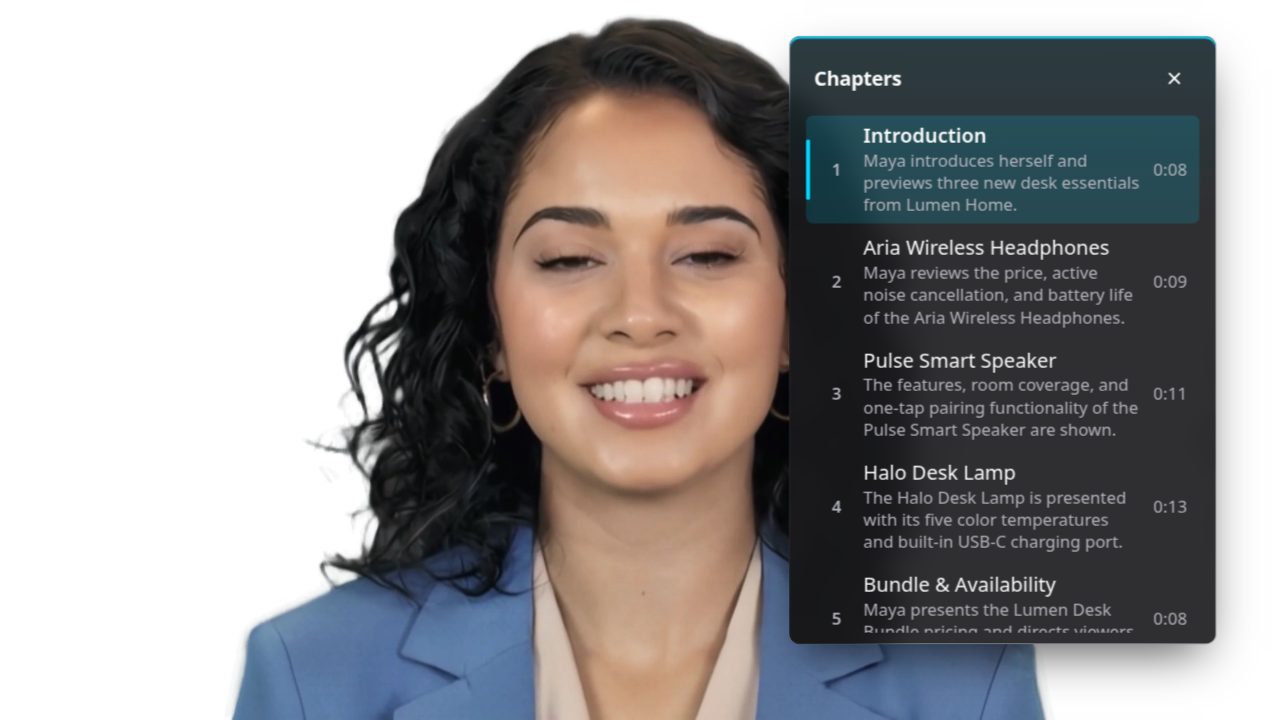
Tap a chapter to jump to it.
About
Cuts turns one video into several. Group your scenes in the Scenes panel, name each group, and this plugin offers those groups to the viewer as lengths to choose from. Picking one plays only its scenes, back to back, as though the rest of the file were not there.
- What it does: offers a 90-second cut, a five-minute cut and the full video from the same file, with an optional chapters panel over whichever one is playing.
- Step 1: in the Scenes panel, group the scenes that make up each cut. One group per length.
- Step 2: install Cuts from the marketplace.
- Step 3: add one Cuts overlay covering the whole timeline. One overlay is the whole plugin; do not add one per cut.
- Step 4: tick the scene groups you want to offer, choose which cut plays by default, and pick a theme.
- Step 5: test it on a phone. The cards are the part viewers actually touch.
- How it behaves: the gaps between a cut's scenes are never shown, scrubbing and skipping stay inside the chosen cut, and the end card opens when the cut runs out rather than when the file does. If the host application forces a path of its own, the switcher hides itself and gets out of the way.
- The chapters panel, when it is on, opens from a Chapters entry in the same settings menu, so the viewer needs no keyboard and you need no rule.
- The viewer switches from the player's settings menu, from the entry card at the start, or from the end card. Every route ends up in the same place, and the plugin follows the engine rather than its own request, so the menu never shows a length that is not actually playing.
- For power users: the plugin emits Cut Selected, Entry Card Shown, Entry Card Dismissed, Entry Card Timed Out, Skip Card Shown, Skipped Part Watched, End Card Shown, End Card Action, Chapters Opened, Chapters Closed and Chapter Selected, and it accepts the actions Set Cut, Next Chapter, Previous Chapter, Go To Chapter, Show Chapters, Hide Chapters, Show Entry Card and Replay Cut.
- Example rule: on plugin:mp4e:cuts:cut:selected, run setVariable to store eventData.label in a variable, then interpolate it anywhere as the length the viewer chose.
- Example rule: on plugin:mp4e:cuts:endCard:action, add a condition that eventData.action equals cta, then run showOverlay on your own sign-up overlay.
Settings
What a creator can set in the Studio, and what a host can set in its overrides.
Style
| Setting | Type | Default | What it does |
|---|---|---|---|
Fontfont | Text | - | A CSS font stack, e.g. "Georgia, serif". Use fonts the viewer's device already has; plugins cannot download fonts. Leave empty for the theme's own. |
Sizesize | One of | Normal | How large everything is, on top of scaling with the video. Lean-back is for a TV across the room. |
Themetheme | One of | Studio | The look. Pick the same theme on every family plugin in a video and they read as one set. Cuts' older theme names still work and show as the family theme named beside them. |
Accent colouraccent | Colour | - | Buttons, highlights and the focus ring, as #rrggbb (or #rgb, rgb(), rgba()). Leave empty for the theme's own. The text on it is picked for you so it stays readable. |
Motionmotion | One of | Full | How things appear and move. A viewer who has asked their device for reduced motion always gets at most Reduced. |
Corner roundingradius | Number, 0 to 200 | - | Corner radius of panels and cards, in pixels of a 1920-wide frame. Leave empty for the theme's own. |
Background coloursurface | Colour | - | The panels' background, as #rrggbb (or #rgb, rgb(), rgba() for see-through). Leave empty for the theme's own. If the theme's text would not read on it, a readable one is used. |
Card positionposition | One of | center | Where the cards sit in the frame. The chapters panel always sits at the side, the skip note at the bottom right. |
Custom CSScustomCss | Text | - | Extra CSS injected into the plugin frame, after the theme. For fine adjustments the settings above do not reach. |
Text colourtextColor | Colour | - | As #rrggbb (or #rgb, rgb(), rgba()). Leave empty for the theme's own (or the readable one picked for your background colour). |
Behavior
| Setting | Type | Default | What it does |
|---|---|---|---|
Log to the consoledebug | On or off | Off | Prints what the plugin decides and why. For building, not for publishing. |
Stacking orderzIndex | Number | 1000000 | How the cards stack against your other overlays. Higher sits on top. The default sits above authored overlays; lower it only to deliberately put something in front of the cards. |
Keyboard shortcutskeyboard | On or off | Off | C opens the chapters panel; [ and ] step to the previous and next chapter. |
Remember the viewer's choicerememberChoice | On or off | Off | Stores the chosen cut on this device and starts there next time. Ignored when the viewer has limited storage. |
Older look settings
| Setting | Type | Default | What it does |
|---|---|---|---|
Animationanimation | One of | fade | Older setting. 'None' turns all motion off, whatever Motion says. Prefer Motion. |
Brand fontfontFamily | Text | - | Older setting, read only when Theme is 'Brand': it fills Font when that is empty. Prefer Font, which works with every theme. |
Brand accent colouraccentColor | Colour | - | Older setting, read only when Theme is 'Brand': it fills Accent colour when that is empty. Prefer Accent colour, which works with every theme. |
Menu
| Setting | Type | Default | What it does |
|---|---|---|---|
Menu iconmenu.icon | Text | - | Name of an icon to show beside the menu entry. Leave empty unless the player's controls ship that icon — the standard controls know speed, subtitles, audio, shield and pip, and draw the first letter of anything else. |
Menu labelmenu.label | Text | Length | What the menu entry is called. Viewers read this, so name it for them. |
Add to the player menumenu.enabled | On or off | On | Puts the cuts in the player's settings menu, so the viewer can switch at any time. Also carries the Chapters entry when the chapters panel is on. Turning this off leaves the panel reachable only from a rule or the keyboard. |
Cuts
| Setting | Type | Default | What it does |
|---|---|---|---|
Offer the full videoofferFull | On or off | On | Include 'Full video' alongside the cuts, so the viewer can always go back to everything. |
Default cutdefaultCut | A scene group | full | What plays for a viewer who never chooses. 'Full video' starts on the whole timeline. |
CutscutGroupIds | A scene group | - | The scene groups offered as cuts, in the order you tick them. Each one plays its scenes back to back as one continuous, shorter watch. |
End card
| Setting | Type | Default | What it does |
|---|---|---|---|
Call to actionendCard.cta | JSON | - | Your own button on the end card: {"label": "Book a demo", "url": "https://..."}. Use "overlayId" instead of "url" to open one of your overlays from a rule on the End Card Action event. Needs a label and one of the two. |
Card at the endendCard.enabled | On or off | On | Opens when the chosen cut reaches its last scene. |
Offer the full videoendCard.offerFull | On or off | On | Adds a button that leaves the cut and plays the whole video from the top. Hidden when the full video is already playing. |
Offer a replayendCard.offerReplay | On or off | On | Adds a button that restarts the cut the viewer just watched. |
Entry card
| Setting | Type | Default | What it does |
|---|---|---|---|
Card headingentryCard.title | Text | How long have you got? | The question at the top of the card. Viewers read this. |
Ask before the video startsentryCard.enabled | On or off | Off | Opens a card at the start so the viewer picks a length up front. |
Card subheadingentryCard.subtitle | Text | Pick a length. You can change it any time from the player menu. | The line under the heading. Leave it empty for no subheading. |
Ask again on replayentryCard.showOnReplay | On or off | On | Show the card again when the viewer replays, so they can pick a different length. |
Decide after (seconds)entryCard.timeoutSeconds | Number | 0 | Close the card after this long, as Not now does — no cut is chosen for the viewer. 0 waits for the viewer. |
Let the video play underneathentryCard.autoplayUnderCard | On or off | Off | Play the default cut behind the card instead of holding the video at the start. |
Close after playing (seconds)entryCard.playingTimeoutSeconds | Number | 10 | Close the card once the video has played this long underneath it, as Not now does — no cut is chosen for the viewer. Counts playback only, so a card holding the video at the start stays up. 0 never closes it this way. |
Chapters
| Setting | Type | Default | What it does |
|---|---|---|---|
Chapters panelchapters.enabled | On or off | Off | Lists the scenes of whichever cut is playing, so the viewer can jump between them. Adds a Chapters entry to the player's settings menu to open it. |
Chapters for the full videochapters.fullGroupId | A scene group | - | The full timeline has no scene group of its own. Pick the group whose scenes stand in as chapters while the full video plays. Pick None for no chapters there. |
Show scene summarieschapters.showSummaries | On or off | On | Print each scene's description under its name in the panel. |
Summary overrideschapters.summaryOverrides | JSON | - | Replacement summaries keyed by scene id, e.g. {"scene_2": "The bit about pricing"}. Anything not listed keeps the scene's own description. |
Skip card
| Setting | Type | Default | What it does |
|---|---|---|---|
Mention what was skippedskipCard.enabled | On or off | Off | Show a small note each time the cut jumps over part of the video. |
Offer to watch it after allskipCard.allowWatch | On or off | On | Adds a button that leaves the cut, rewinds to the skipped part, and plays it. |
Stay on screen for (seconds)skipCard.durationSeconds | Number | 4 | How long the note lingers before it hides itself. 0 keeps it up until dismissed. |
Events and actions
Events you can react to
| Event | When it is sent | Data |
|---|---|---|
Cut Selectedplugin:mp4e:cuts:cut:selected | The playing cut changed, or the viewer re-picked the one already playing. Follows the engine, so it also fires when the host or another plugin changes the path. Re-picking the active cut is idempotent: the engine reports no change, and this event still fires. |
|
End Card Shownplugin:mp4e:cuts:endCard:shown | The chosen cut reached its end and the card opened. |
|
End Card Actionplugin:mp4e:cuts:endCard:action | A button on the end card was clicked. Filter on 'action' to tell them apart. |
|
Skip Card Shownplugin:mp4e:cuts:skipCard:shown | The cut jumped over part of the video and the note was displayed. |
|
Chapters Closedplugin:mp4e:cuts:chapters:closed | The chapters panel closed. | - |
Chapters Openedplugin:mp4e:cuts:chapters:opened | The chapters panel opened. | - |
Entry Card Shownplugin:mp4e:cuts:entryCard:shown | The 'how long have you got' card opened. | - |
Chapter Selectedplugin:mp4e:cuts:chapter:selected | The viewer picked a chapter and the playhead moved to that scene. |
|
Skipped Part Watchedplugin:mp4e:cuts:skipCard:watched | The viewer asked to watch the skipped stretch, so the cut was left and the playhead rewound to it. |
|
Entry Card Timed Outplugin:mp4e:cuts:entryCard:timedOut | Nobody chose in time, so the card closed by itself as Not now does. Nothing was applied. |
|
Entry Card Dismissedplugin:mp4e:cuts:entryCard:dismissed | The viewer closed the entry card without picking, or picked and closed it. |
|
Actions a rule or the host can call
| Action | What it does | Its settings |
|---|---|---|
Set CutsetCut | Switch to one of the configured cuts, or back to the full video. |
|
Next Chapternext | Move to the next chapter of the playing cut. | - |
Previous Chapterprevious | Move to the previous chapter of the playing cut. | - |
Go To ChaptergoToChapter | Jump to a specific chapter by scene id. |
|
Show ChaptersshowChapters | Open the chapters panel. | - |
Hide ChaptershideChapters | Close the chapters panel. | - |
Show Entry CardshowEntryCard | Open the card that asks the viewer to pick a length. | - |
Replay Cutreplay | Restart the playing cut from its first scene. | - |
What it can reach
- Can change which part of the video playsSwitches between the cuts you configured and jumps between chapters.
Versions
- v1.4.2November 4, 2026Current
What changed
1.4.2: on a page given to a remote, an entry card over a playing video no longer takes the keys from a viewer who is watching: Up reaches it. An open surface keeps a remote until Back closes it, and a remote leaves the rest at the edge (kit 1.3.1); a Back that closes a surface does not also leave the frame. 1.4.0: the Atelier theme (kit 1.3.0). 1.3.0: the entry card closes by itself once the video has played underneath it for entryCard.playingTimeoutSeconds (default 10; 0 turns it off), as Not now does — a card over a playing video no longer covers it until the viewer answers. entryCard:timedOut now carries reason: time or playback. 1.2.0: Family kit 1.1.0: a minimum readable size on small players — Cuts' boxes grow with the text (--fam-k), and on a phone-sized player the cards and the chapters panel become sheets across the frame that scroll inside instead of spilling. Since 1.1.0 (joining the family), radius applies under every theme, not only Brand. Every card and the chapters panel keep 76 real pixels clear of the player's control bar at any player size (on a phone the bar used to cover the entry card's "Not now"). An overlay still on an older theme ignores textColor and surface, as Cuts always did, so a stray saved value cannot recolour it. The start and end cards are centred without the CSS translate property, so they stay centred on older TV browsers (Chromium 87 to 103).
- v1.4.1November 3, 2026
What changed
1.4.0: the Atelier theme (kit 1.3.0). 1.3.0: the entry card closes by itself once the video has played underneath it for entryCard.playingTimeoutSeconds (default 10; 0 turns it off), as Not now does — a card over a playing video no longer covers it until the viewer answers. entryCard:timedOut now carries reason: time or playback. 1.2.0: Family kit 1.1.0: a minimum readable size on small players — Cuts' boxes grow with the text (--fam-k), and on a phone-sized player the cards and the chapters panel become sheets across the frame that scroll inside instead of spilling. Since 1.1.0 (joining the family), radius applies under every theme, not only Brand. Every card and the chapters panel keep 76 real pixels clear of the player's control bar at any player size (on a phone the bar used to cover the entry card's "Not now"). An overlay still on an older theme ignores textColor and surface, as Cuts always did, so a stray saved value cannot recolour it. The start and end cards are centred without the CSS translate property, so they stay centred on older TV browsers (Chromium 87 to 103).
- v1.4.0October 25, 2026
What changed
1.4.0: the Atelier theme (kit 1.3.0). 1.3.0: the entry card closes by itself once the video has played underneath it for entryCard.playingTimeoutSeconds (default 10; 0 turns it off), as Not now does — a card over a playing video no longer covers it until the viewer answers. entryCard:timedOut now carries reason: time or playback. 1.2.0: Family kit 1.1.0: a minimum readable size on small players — Cuts' boxes grow with the text (--fam-k), and on a phone-sized player the cards and the chapters panel become sheets across the frame that scroll inside instead of spilling. Since 1.1.0 (joining the family), radius applies under every theme, not only Brand. Every card and the chapters panel keep 76 real pixels clear of the player's control bar at any player size (on a phone the bar used to cover the entry card's "Not now"). An overlay still on an older theme ignores textColor and surface, as Cuts always did, so a stray saved value cannot recolour it. The start and end cards are centred without the CSS translate property, so they stay centred on older TV browsers (Chromium 87 to 103).
- v1.3.0October 18, 2026
What changed
The entry card closes by itself once the video has played underneath it for entryCard.playingTimeoutSeconds (default 10; 0 turns it off), as Not now does — a card over a playing video no longer covers it until the viewer answers. entryCard:timedOut now carries reason: time or playback. 1.2.0: Family kit 1.1.0: a minimum readable size on small players — Cuts' boxes grow with the text (--fam-k), and on a phone-sized player the cards and the chapters panel become sheets across the frame that scroll inside instead of spilling. Since 1.1.0 (joining the family), radius applies under every theme, not only Brand. Every card and the chapters panel keep 76 real pixels clear of the player's control bar at any player size (on a phone the bar used to cover the entry card's "Not now"). An overlay still on an older theme ignores textColor and surface, as Cuts always did, so a stray saved value cannot recolour it. The start and end cards are centred without the CSS translate property, so they stay centred on older TV browsers (Chromium 87 to 103).
- v1.2.0October 13, 2026
What changed
Family kit 1.1.0: a minimum readable size on small players — Cuts' boxes grow with the text (--fam-k), and on a phone-sized player the cards and the chapters panel become sheets across the frame that scroll inside instead of spilling. Since 1.1.0 (joining the family), radius applies under every theme, not only Brand. Every card and the chapters panel keep 76 real pixels clear of the player's control bar at any player size (on a phone the bar used to cover the entry card's "Not now"). An overlay still on an older theme ignores textColor and surface, as Cuts always did, so a stray saved value cannot recolour it. The start and end cards are centred without the CSS translate property, so they stay centred on older TV browsers (Chromium 87 to 103).
- v1.1.1October 10, 2026
What changed
Family kit 1.1.0: a minimum readable size on small players — Cuts' boxes grow with the text (--fam-k), and on a phone-sized player the cards and the chapters panel become sheets across the frame that scroll inside instead of spilling. Since 1.1.0 (joining the family), radius applies under every theme, not only Brand. Every card and the chapters panel keep 76 real pixels clear of the player's control bar at any player size (on a phone the bar used to cover the entry card's "Not now"). An overlay still on an older theme ignores textColor and surface, as Cuts always did, so a stray saved value cannot recolour it. The start and end cards are centred without the CSS translate property, so they stay centred on older TV browsers (Chromium 87 to 103).
- v1.0.12October 10, 2026
What changed
Archived version
- v1.0.11September 5, 2026
What changed
Archived version
- v1.0.10September 3, 2026
What changed
Archived version
- v1.0.9September 3, 2026
What changed
Archived version
- v1.0.8September 3, 2026
What changed
Archived version
- v1.0.7September 3, 2026
What changed
Archived version
- v1.0.6September 3, 2026
What changed
Archived version
- v1.0.5September 2, 2026
What changed
Archived version
- v1.0.4September 2, 2026
What changed
Archived version
- v1.0.3September 2, 2026
What changed
Archived version
- v1.0.2September 2, 2026
What changed
Archived version
- v1.0.1September 2, 2026
What changed
Archived version
- v1.0.0September 2, 2026
What changed
Archived version