
Preview
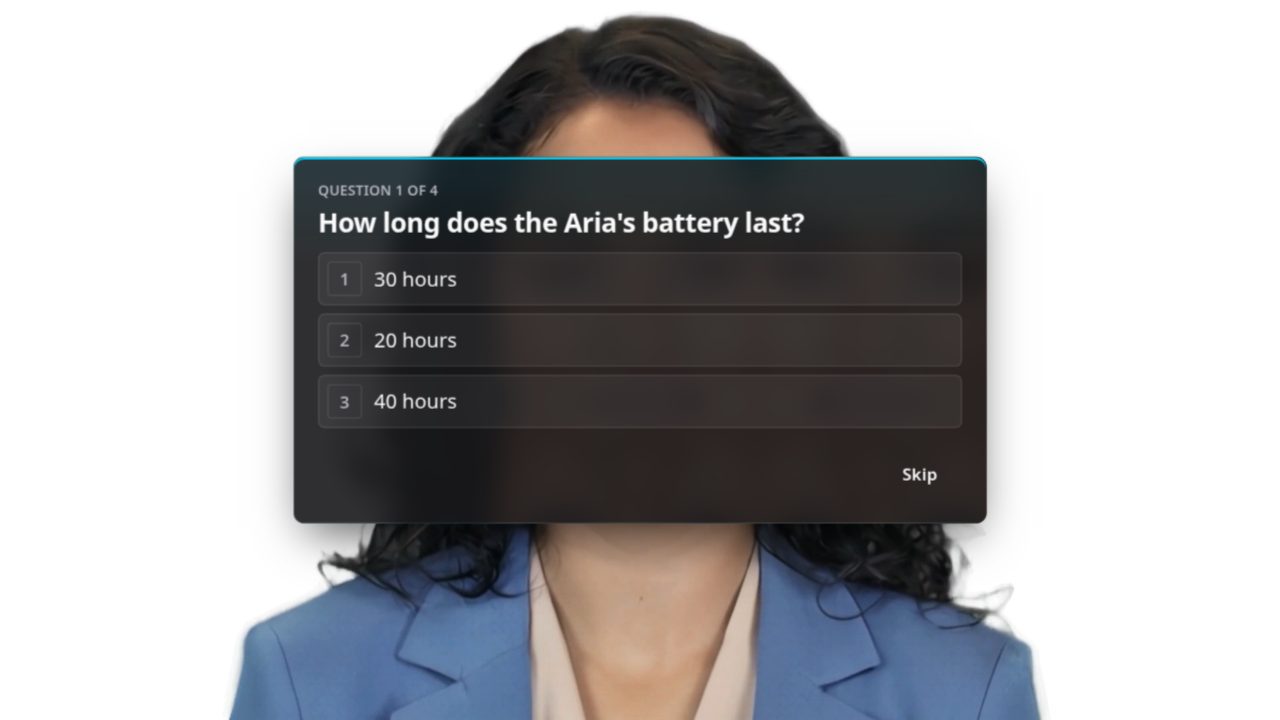
Pick an answer.
About
Quiz asks the viewer questions at the moments you choose. The video pauses, the viewer picks an answer and sees at once whether it was right and why, then plays on. At the end a summary shows the score, with every answer to review.
- What it does: at each question's time the video pauses and a card shows the question with two to four answers. After an answer the card says Correct or Not quite, shows the right answer and your explanation, and Continue plays on. After the last question the summary shows the score.
- Content: list the questions in the Questions setting, each with the second it appears, its answers, which one is right (counting from 0) and an optional explanation.
- Step 1: install Quiz from the marketplace.
- Step 2: add one Quiz overlay covering the whole timeline. It covers the whole frame and places its own card, so do not resize it: pick Centre, Left or Right in Position instead.
- Step 3: enter the questions.
- Step 4: pick a theme and a size. Lean-back is for a TV across the room.
- How it behaves: while the video plays every click goes through to the video. While a question or the summary is up, the quiz takes the pointer and the keys: the arrows move between the answers, Enter answers and then continues. Skip leaves a question unanswered; pressing play does too.
- Seeking past a question does not ask it. Seeking back before a question that was not answered asks it again; an answered one is never asked twice.
- Options: Pause (on by default) stops the video for each question; with it off the question shows over the playing video and closes by itself after Answer time (20 seconds by default). Second try lets a viewer try once more before the answer is shown. Summary at a time shows the score at that second instead of after the last question. Remember answers keeps a viewer's answers on that device.
- For power users: the plugin emits Question Shown, Answered and Completed, and accepts the actions Start Quiz, Skip Question, Hide Quiz, Show Quiz and Reset Quiz.
- Example rule: on plugin:mp4e:quiz:completed, add a condition that eventData.score equals eventData.total, then run showOverlay on a certificate.
Settings
What a creator can set in the Studio, and what a host can set in its overrides.
Style
| Setting | Type | Default | What it does |
|---|---|---|---|
Fontfont | Text | - | A CSS font stack, e.g. "Georgia, serif". Use fonts the viewer's device already has; plugins cannot download fonts. Leave empty for the theme's own. |
Sizesize | One of | Normal | How large everything is, on top of scaling with the video. Lean-back is for a TV across the room. |
Themetheme | One of | Studio | The look. Pick the same theme on every family plugin in a video and they read as one set. |
Accent colouraccent | Colour | - | Buttons, highlights and the focus ring, as #rrggbb (or #rgb, rgb(), rgba()). Leave empty for the theme's own. The text on it is picked for you so it stays readable. |
Motionmotion | One of | Full | How things appear and move. A viewer who has asked their device for reduced motion always gets at most Reduced. |
Corner roundingradius | Number, 0 to 200 | - | Corner radius of panels and cards, in pixels of a 1920-wide frame. Leave empty for the theme's own. |
Background coloursurface | Colour | - | The panels' background, as #rrggbb (or #rgb, rgb(), rgba() for see-through). Leave empty for the theme's own. If the theme's text would not read on it, a readable one is used. |
Text colourtextColor | Colour | - | As #rrggbb (or #rgb, rgb(), rgba()). Leave empty for the theme's own (or the readable one picked for your background colour). |
Behavior
| Setting | Type | Default | What it does |
|---|---|---|---|
Pause for each questionpause | On or off | On | Stop the video while a question is up; Continue plays on. Off: the question shows while the video keeps playing, and closes by itself after Answer time. |
Second tryretry | On or off | Off | After a wrong answer the viewer may try once more before the right answer is shown. |
Remember answerspersist | On or off | Off | Keep a viewer's answers the next time they open the video, on the same device: an answered question is not asked again. Stored in the player's per-plugin storage. |
Summary at (seconds, optional)summaryAt | Number | - | Show the summary when the video reaches this second. Leave empty to show it after the last question. |
Answer time (seconds)answerTime | Number, at least 1 | 20 | Only with Pause off: while a question is up it takes the viewer's taps and keys, so it closes by itself after this many seconds of playback without an answer (counted as skipped). A bar on the card shows the time left; an answer restarts it for the feedback. |
Show the summaryshowSummary | On or off | On | Show the score at the end, with every answer to review. |
Content
| Setting | Type | Default | What it does |
|---|---|---|---|
Titletitle | Text | Quiz | Named above the score on the summary. |
Questionsquestions | List | - | Each question's text, the second it appears, two to four answers, which answer is right (0 is the first) and an optional explanation shown after answering. Strings interpolate, so a {{variable}} may supply a question's text or the whole list. |
Layout
| Setting | Type | Default | What it does |
|---|---|---|---|
Positionposition | One of | Centre | Where the question card sits in the frame. On a phone-sized player it always spans the frame. |
Events and actions
Events you can react to
| Event | When it is sent | Data |
|---|---|---|
Answeredplugin:mp4e:quiz:answered | The viewer gave a question its final answer (with Second try on, a first wrong pick is not final). |
|
Completedplugin:mp4e:quiz:completed | The quiz reached its end: after the last question, or at Summary at. Once, until Reset Quiz. |
|
Question Shownplugin:mp4e:quiz:questionShown | A question came up: playback reached its time, or Start Quiz opened it. |
|
Actions a rule or the host can call
| Action | What it does | Its settings |
|---|---|---|
Start Quizstart | Show the first question not yet answered now, wherever the video is (pausing it when Pause is on). With every question answered, show the summary. | - |
Skip Questionskip | Close the question on screen without answering it (or close the summary) and play on. | - |
Hide Quizhide | Close what is on screen (playing on if the quiz paused the video) and ask nothing more until Show Quiz. Questions passed while hidden are asked again only after seeking back before them. | - |
Show Quizshow | Undo Hide Quiz: questions come up again when playback reaches them. | - |
Reset Quizreset | Forget every answer (also the remembered ones), close what is on screen and ask each question again when playback reaches it. | - |
What it can reach
This plugin asks for nothing: no network, no reading of the video's analysis, no say over what plays.
Versions
- v1.1.2November 4, 2026Current
What changed
1.1.2: answers are numbered and the number keys answer them; an open surface keeps a remote until Back closes it, and a remote leaves the rest at the edge (kit 1.3.1). 1.1.0: the Atelier theme (kit 1.3.0). First release: checkpoint questions in the family design system's five themes, three sizes and keyboard/remote navigation.
- v1.1.1November 3, 2026
What changed
1.1.0: the Atelier theme (kit 1.3.0). First release: checkpoint questions in the family design system's five themes, three sizes and keyboard/remote navigation.
- v1.1.0October 25, 2026
What changed
1.1.0: the Atelier theme (kit 1.3.0). First release: checkpoint questions in the family design system's five themes, three sizes and keyboard/remote navigation.
- v1.0.0October 10, 2026
What changed
First release: checkpoint questions in the family design system's five themes, three sizes and keyboard/remote navigation.