
Preview
About
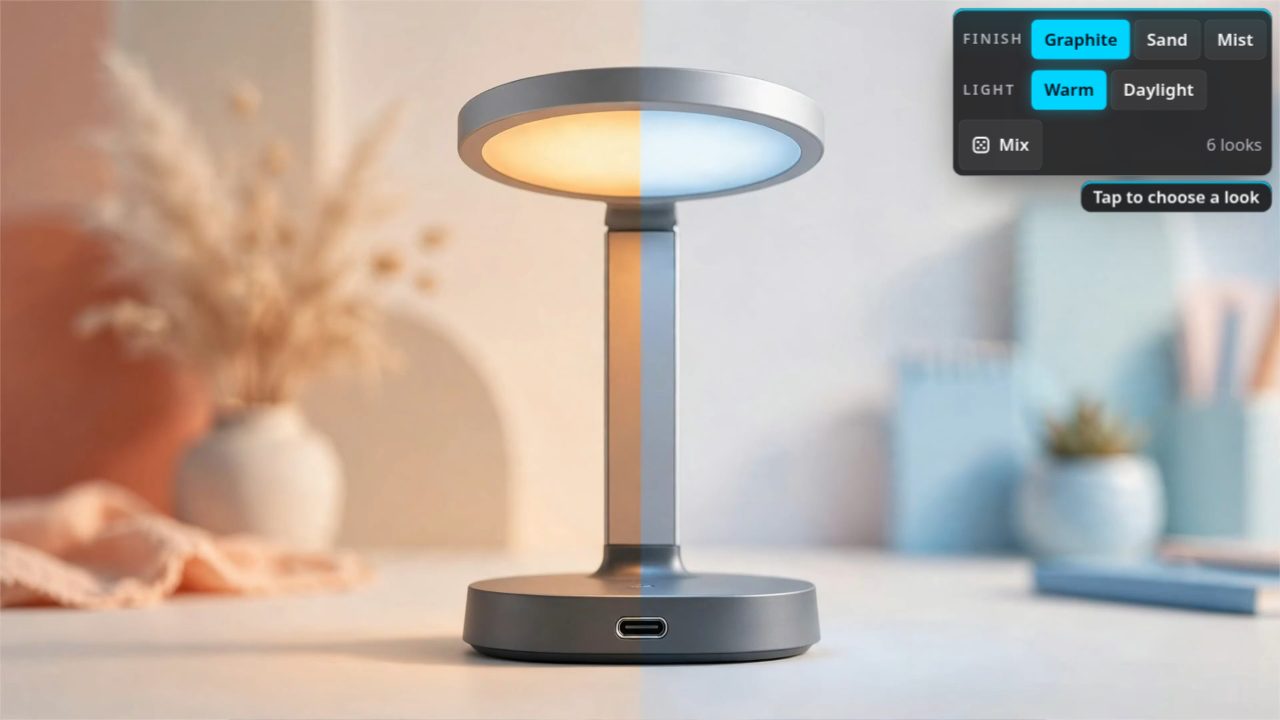
Style picker lets a viewer choose what the video shows while it plays. Each row is a text variable with named options; a pick sets the variable, and anything reading that variable follows, such as a replacement zone that shows a different variant.
- Rows: list them in the Rows setting. A row has an id, a label, the variable it sets, its current value ("{{variable}}", so it stays right when a rule or your page sets the variable) and its options, each with a key (the value it sets), a name and an optional picture.
- A preset row has no variable of its own: a pick sets every other row to the same key, and it shows the key they all share.
- Mix chooses at random across the rows, and never repeats the combination on screen.
- Where it fits it shows the whole tray, a row of chips per variable. On a phone it becomes a deck: a tab per row and big tiles for the row in hand, with the option's picture or a letter when it has none.
- Step 1: install Style picker from the marketplace.
- Step 2: add a Style picker overlay. It sits in a top corner of its box, so place the box at the top of the frame and keep it under half the frame: object cards then stay clear of it.
- Step 3: enter the rows, then read each variable where it matters.
- Step 4: pick a theme and a size.
- How it behaves: only the tray or the deck takes the pointer; every tap anywhere else goes through to the video. A keyboard or TV remote reaches it with Tab: arrows move between options, Enter picks one, Back leaves.
- For power users: the action Next look (for a video that loops; it stops once the viewer has picked) and the event Row Changed.
Settings
What a creator can set in the Studio, and what a host can set in its overrides.
Style
| Setting | Type | Default | What it does |
|---|---|---|---|
Fontfont | Text | - | A CSS font stack, e.g. "Georgia, serif". Use fonts the viewer's device already has; plugins cannot download fonts. Leave empty for the theme's own. |
Sizesize | One of | Normal | How large everything is, on top of scaling with the video. Lean-back is for a TV across the room. |
Themetheme | One of | Studio | The look. Pick the same theme on every family plugin in a video and they read as one set. |
Accent colouraccent | Colour | - | Buttons, highlights and the focus ring, as #rrggbb (or #rgb, rgb(), rgba()). Leave empty for the theme's own. The text on it is picked for you so it stays readable. |
Motionmotion | One of | Full | How things appear and move. A viewer who has asked their device for reduced motion always gets at most Reduced. |
Corner roundingradius | Number, 0 to 200 | - | Corner radius of panels and cards, in pixels of a 1920-wide frame. Leave empty for the theme's own. |
Background coloursurface | Colour | - | The panels' background, as #rrggbb (or #rgb, rgb(), rgba() for see-through). Leave empty for the theme's own. If the theme's text would not read on it, a readable one is used. |
Text colourtextColor | Colour | - | As #rrggbb (or #rgb, rgb(), rgba()). Leave empty for the theme's own (or the readable one picked for your background colour). |
Content
| Setting | Type | Default | What it does |
|---|---|---|---|
Invitationhint | Text | Tap to choose a look | A line under the picker at the start, and once more on the second pass of a loop if nobody has picked. Empty: no invitation. |
Rowsrows | List | - | One row each, in order: {id, label, variable, current, options: [{key, name, thumb}], preset}. Every row but a preset is a text variable whose value is the key of the option on screen. |
Mix buttonshuffleLabel | Text | Mix |
Layout
| Setting | Type | Default | What it does |
|---|---|---|---|
Corneralign | One of | Right | The top corner of the overlay's box the picker sits in. |
Events and actions
Events you can react to
| Event | When it is sent | Data |
|---|---|---|
Row Changedplugin:mp4e:style-picker:rowChanged | A row was set: by the viewer's tap, Mix or the Next look action. A preset pick emits it for the preset row and for each row it changed. |
|
Actions a rule or the host can call
| Action | What it does | Its settings |
|---|---|---|
Next looknext | Take the preset row's next option (with no preset row, a random mix), until the viewer has picked anything themself. For a video that loops: a scene's end calls it, then seeks back to the start. | - |
What it can reach
This plugin asks for nothing: no network, no reading of the video's analysis, no say over what plays.
Versions
- v1.0.1November 2, 2026Current
What changed
1.0.1: the deck always shows a whole row of tiles: on a short video its tiles get shorter, then it becomes one line; the invitation shows only when it fits. 1.0.0: first release — rows of named options that set text variables, a preset row that sets every row, Mix, a tray that gives way to a deck of tiles on a phone, in the family design system's six themes and three sizes.
- v1.0.0November 2, 2026
What changed
1.0.0: first release — rows of named options that set text variables, a preset row that sets every row, Mix, a tray that gives way to a deck of tiles on a phone, in the family design system's six themes and three sizes.