
Preview
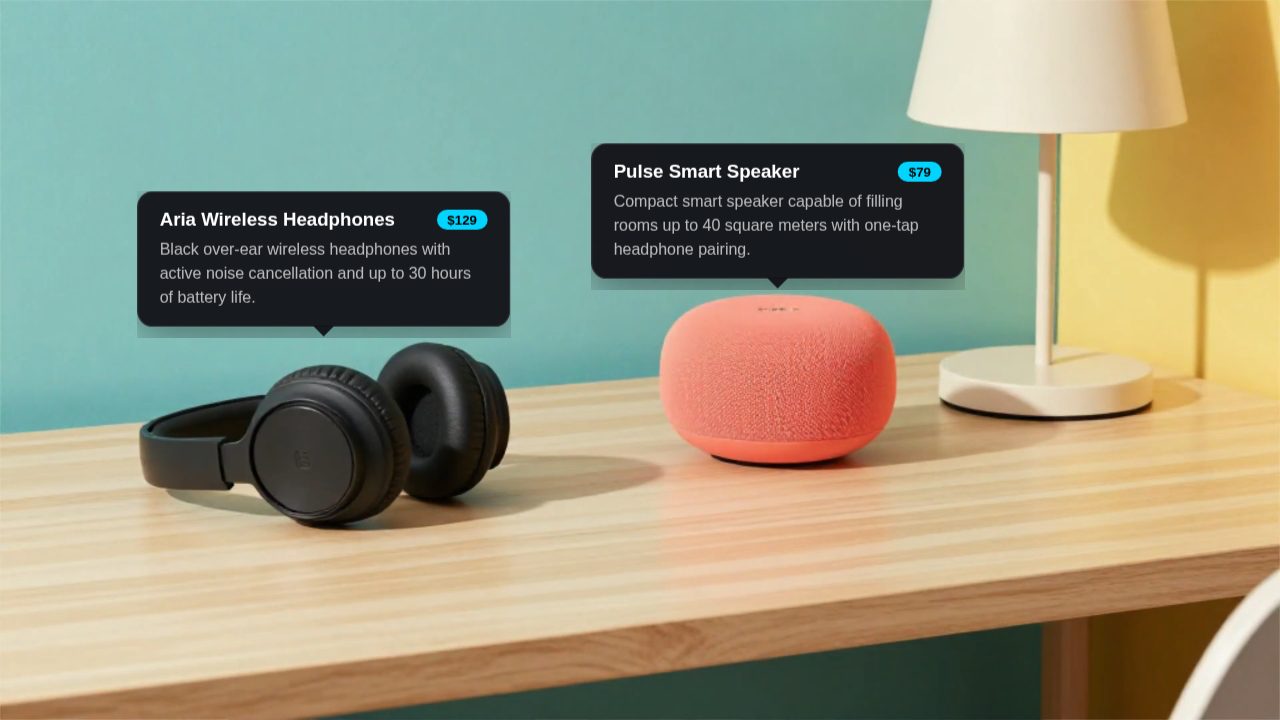
Tap the product to open its card
About
A small label that opens above a tracked product, with its name, its price and a short description. Each product's own details are filled in.
It opens when the product comes into view or when the viewer taps it, as you set on the object group. A badge, the colours and the roundness are settings.
Settings
What a creator can set in the Studio, and what a host can set in its overrides.
Content
| Setting | Type | Default | What it does |
|---|---|---|---|
Badge Textbadge | Text | NEW | Small pill beside the title, such as NEW. Left empty, no badge is shown. |
Titlelabel | Text | Premium Chair | Name in bold at the top of the card, e.g. {{object.userLabel}} for each object's own name. |
Descriptiondescription | Text | Handcrafted Italian leather with memory foam | Short text under the title in a lighter color. Left empty, no text is shown. |
Style
| Setting | Type | Default | What it does |
|---|---|---|---|
Text ColortextColor | Colour | #ffffff | Color of the title. The description is always a translucent white. |
RoundnessborderRadius | Number, 0 to 24 | 12 | Corner rounding of the card, from 0 (square) to 24 pixels. |
Accent ColorprimaryColor | Colour | #00D4FF | Fill of the badge; the badge text is always black. |
BackgroundbackgroundColor | Colour | rgba(17,17,22,0.95) | Fill of the card and its pointer arrow; a transparent value lets the video show through, blurred. |
What it can reach
This plugin asks for nothing: no network, no reading of the video's analysis, no say over what plays.
Versions
- v1.0.0November 27, 2026
What changed
Archived before v1.0.1.
- v1.0.1November 27, 2026Current
What changed
1.0.1: every setting has help text.