
Preview
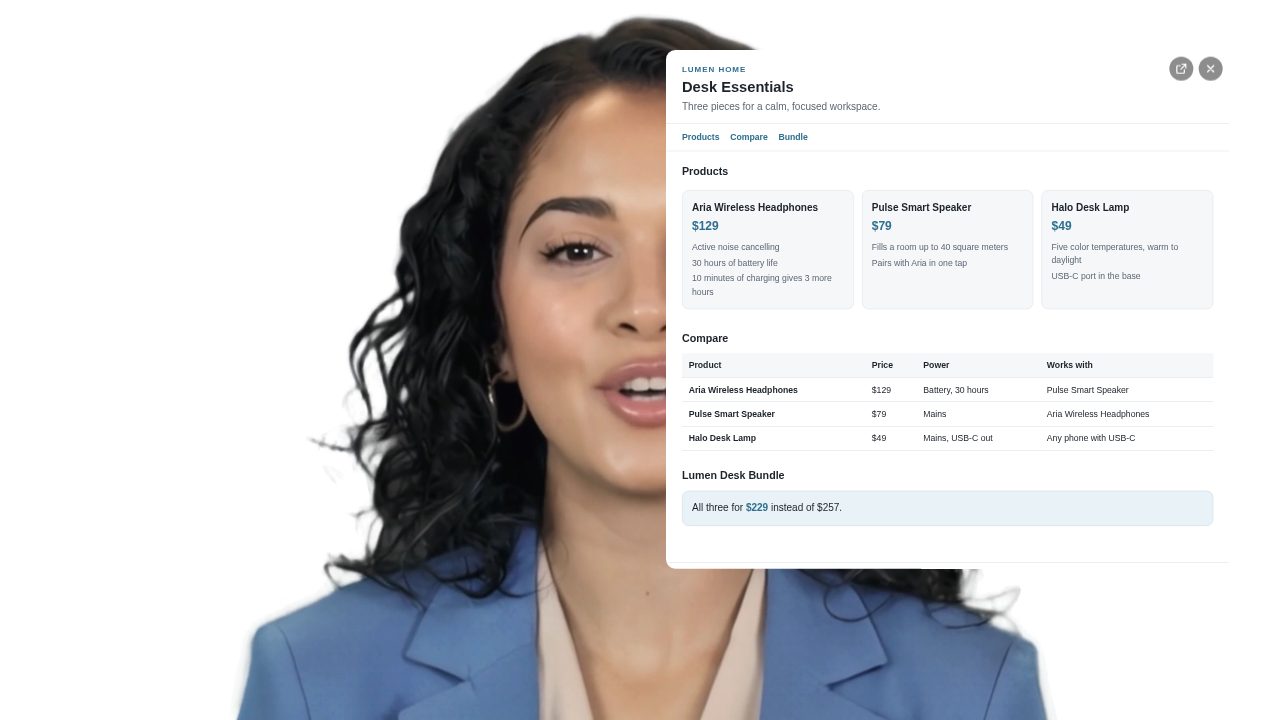
Scroll the page, or click the video outside the panel to close it.
About
Shows a web page inside the video, in a panel you place like any overlay. The address can come from a variable (for example {{selectedProductUrl}}), so a rule can change the page when the viewer clicks something.
What it can show
- Plain pages: text, images, tables, product and reference pages, and embeds that need no cookies or storage.
- Addresses that start with https://. An http:// address is shown only when the player page itself is served over http, because browsers block an http page inside an https page.
What it cannot show at the player's default isolation
- The page runs inside the plugin's frame and gets the same limits: it has no origin of its own, so it cannot use cookies, localStorage or sign-ins. A site that needs them shows an error or stays empty; many web apps are such sites.
- It cannot open new windows or tabs, or change the viewer's page, so links that open a new tab do nothing.
- A site that refuses to be shown in a frame (X-Frame-Options or frame-ancestors) shows the browser's own error page. The plugin cannot tell this apart from a page that loaded.
- When the host limits plugins' network to the domains they declare, no page loads, because the player then allows no frames.
What a host can change A host can raise this plugin to the trusted level, with a config.pluginSecurity rule giving mp4e:webview sandbox: 'trusted' (or trustContent: true for every plugin). The page then runs with its own site's origin and can use cookies and storage as far as the browser allows them in an embedded page. It still cannot open new windows or change the viewer's page. The plugin's own frame then shares the host page's origin, and a page from the host's own site would have full access to the host page, so do this only for pages you trust.
For the viewer
- An open button at the top right opens the page in a new tab when the host allows it; use it for pages that cannot be shown here.
- A close button hides the panel, and a click on the video outside the panel can close it too.
- When an address cannot be used, or the page has not loaded after 15 seconds, the panel says so.
Events and variables
loaded: the frame finished loading. It also fires when a site refused to be shown, because the browser then loads its error page.focusedandblurred: the viewer clicked into the page, or back out of it.closed: the viewer closed the panel.mp4e:webview:isLoadedandmp4e:webview:isFocused, for rules such as pausing the video while the viewer reads the page.
Settings
What a creator can set in the Studio, and what a host can set in its overrides.
Content
| Setting | Type | Default | What it does |
|---|---|---|---|
URLurl | Text | - | Address of the web page to show, starting with https://. It can use {{variable}} templates, so a rule can change the page. |
Behavior
| Setting | Type | Default | What it does |
|---|---|---|---|
Scrollingscrolling | One of | auto | Whether the viewer can scroll the page inside the panel: auto shows scroll bars only when the page is longer than the panel. |
Show Open ButtonshowOpenButton | On or off | On | Shows a button at the top right that opens the page in a new tab, when the host allows it. |
Show Close ButtonshowCloseButton | On or off | On | Shows a close button at the top right that hides the panel. |
Close on Click AwaycloseOnClickAway | On or off | On | Hides the panel when the viewer clicks the video outside it. |
Styling
| Setting | Type | Default | What it does |
|---|---|---|---|
Border ColorborderColor | Colour | #333333 | Colour of the border around the panel, when it has one. |
Border WidthborderWidth | Number, 0 to 10 | 0 | Thickness of the border around the panel in pixels; 0 means no border. |
Corner RadiusborderRadius | Number, 0 to 50 | 0 | How rounded the panel's corners are, in pixels. |
Background ColorbackgroundColor | Colour | transparent | Colour behind the page, seen while it loads and through a page with a transparent background. |
Events and actions
Events you can react to
| Event | When it is sent | Data |
|---|---|---|
Closedplugin:mp4e:webview:closed | Fired when the user clicks the close button |
|
Page Loadedplugin:mp4e:webview:loaded | Fired when the page frame finishes loading; also when a site refused to be shown, because the browser then loads its error page |
|
User Leftplugin:mp4e:webview:blurred | Fired when the user clicks back to the video from the webview |
|
User Focusedplugin:mp4e:webview:focused | Fired when the user clicks into the webview and starts interacting with it |
|
Variables it provides
| Variable | What it holds | Type and default |
|---|---|---|
Page Loaded{{mp4e:webview:isLoaded}} | Whether the external page has finished loading | booleanStarts as OffRead only |
User Focused{{mp4e:webview:isFocused}} | Whether the user is currently interacting with the webview | booleanStarts as OffRead only |
What it can reach
- Contacts servers only when the host page allows the requestShows the web page at the address you set, loaded from that page's own site.
Versions
- v1.1.1November 28, 2026Current
What changed
Variables say readOnly instead of the older editable flag.
- v1.0.0November 26, 2026
What changed
Archived before v1.1.0.
- v1.1.0November 26, 2026
What changed
The panel now says in plain words when an address cannot be used or the page is slow, and offers to open the page in a new tab. http:// addresses are refused inside a player served over https, and the description now says which pages work.