
Preview
About
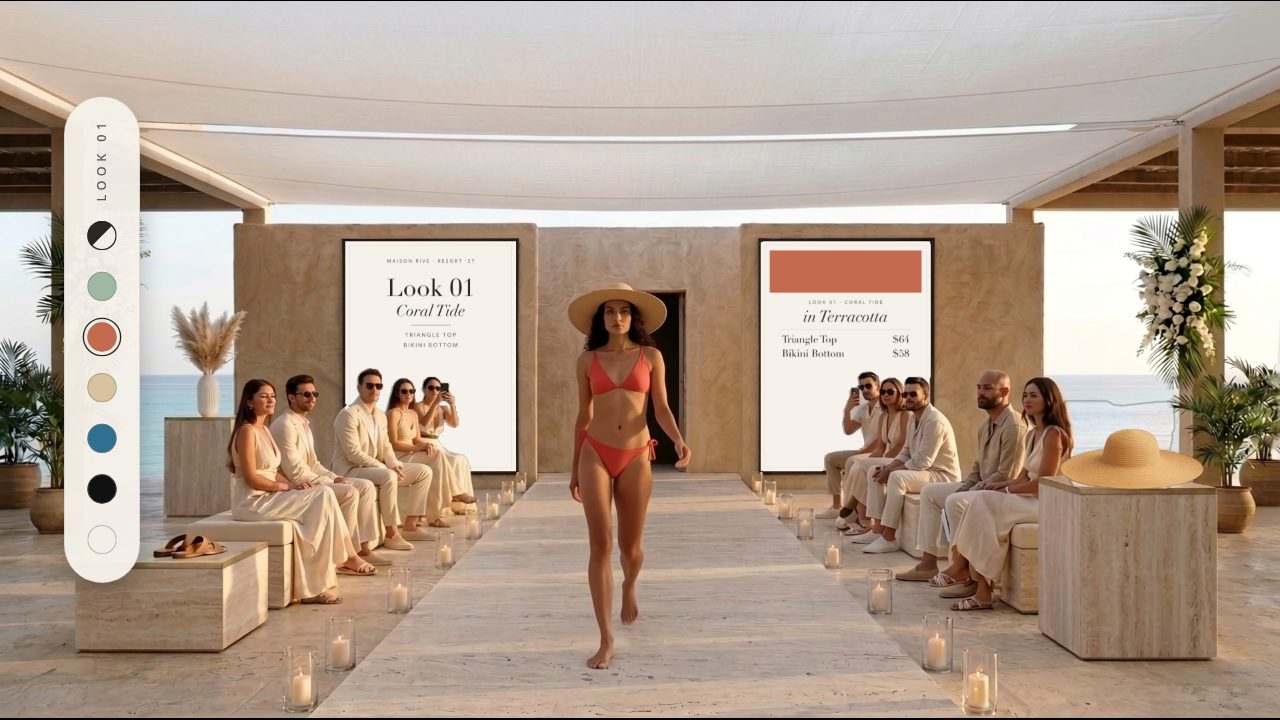
Colourways lets a viewer try a garment in its other colours while the video plays. It follows the runway: whichever look is on screen, its swatches are there, and a tap recolours the outfit live.
- What it does: keeps the viewer's chosen colour for every garment (the Colourways state variable) and shows a selector for the look on screen. Recolour zones read the state, so a choice changes the garment in the footage.
- Styles: Rail (a slim capsule on the left or right edge, the default), Strip (a printed-programme bar along the bottom with the look's name), Chip (a small corner pill that opens the palette) or None (no selector, the state only — for a product card that picks the colour instead). On a phone the rail and the strip become the chip.
- Content: list the looks in the Looks setting. A look has an id, a name ("Lilac Haze"), a label ("Look 03"), its pieces (the tracked objects it is made of) and its colourways (a name and a #rrggbb colour each). A linked look recolours every piece together; an unlinked one shows one row of swatches per piece, and a piece may carry its own colourways.
- The first swatch is always Original: the colour the garment was filmed in.
- Which look shows: the look whose piece is largest on screen, after it has stayed largest for half a second. Pins (a look id and a time range in seconds) force a look during their range. With no look on screen the selector fades out.
- Step 1: install Colourways from the marketplace.
- Step 2: add one Colourways overlay covering the whole timeline. It covers the whole frame and places its own selector, so do not resize it.
- Step 3: enter the looks, then add a recolour zone per piece whose target colour reads {{mp4e:colourways:state.<objectId>.hex}}.
- Step 4: pick a theme and a size.
- How it behaves: the selector is tappable while the video plays and every tap anywhere else goes through to the video. A keyboard or TV remote reaches it with Tab: arrows move between swatches, Enter picks one, Back leaves. Choices last for the session, also when the video loops.
- Variables: Colourways state ({objectId: {look, colourway, name, hex}}) and Colourways catalog (the looks as read). Only Colourways writes them.
- For power users: actions Select Colourway and Reset Colourways; events Colour Chosen and Look Shown.
Settings
What a creator can set in the Studio, and what a host can set in its overrides.
Style
| Setting | Type | Default | What it does |
|---|---|---|---|
Fontfont | Text | - | A CSS font stack, e.g. "Georgia, serif". Use fonts the viewer's device already has; plugins cannot download fonts. Leave empty for the theme's own. |
Sizesize | One of | Normal | How large everything is, on top of scaling with the video. Lean-back is for a TV across the room. |
Themetheme | One of | Studio | The look. Pick the same theme on every family plugin in a video and they read as one set. |
Accent colouraccent | Colour | - | Buttons, highlights and the focus ring, as #rrggbb (or #rgb, rgb(), rgba()). Leave empty for the theme's own. The text on it is picked for you so it stays readable. |
Motionmotion | One of | Full | How things appear and move. A viewer who has asked their device for reduced motion always gets at most Reduced. |
Corner roundingradius | Number, 0 to 200 | - | Corner radius of panels and cards, in pixels of a 1920-wide frame. Leave empty for the theme's own. |
Background coloursurface | Colour | - | The panels' background, as #rrggbb (or #rgb, rgb(), rgba() for see-through). Leave empty for the theme's own. If the theme's text would not read on it, a readable one is used. |
Text colourtextColor | Colour | - | As #rrggbb (or #rgb, rgb(), rgba()). Leave empty for the theme's own (or the readable one picked for your background colour). |
Behavior
| Setting | Type | Default | What it does |
|---|---|---|---|
Pinspins | List | - | Force a look during a time range, in seconds of the video: inside a pin that look shows whatever is on screen. |
Content
| Setting | Type | Default | What it does |
|---|---|---|---|
Lookslooks | List | - | The looks, each {id, name, label, linked (default true), pieces: [{objectId, name, colourways?}], colourways: [{id, name, hex}]}. A linked look recolours all its pieces together; an unlinked one shows one row per piece, and a piece may carry its own colourways. A {{variable}} holding the array or its JSON text overrides the list (the host's path). |
Layout
| Setting | Type | Default | What it does |
|---|---|---|---|
Selectorstyle | One of | Rail | Rail: a slim capsule on the frame edge. Strip: a bar along the bottom with the look's name. Chip: a corner pill that opens the palette. None: no selector — Colourways keeps the state only (a product card picks the colour). On a phone the rail and the strip become the chip. |
Positionposition | One of | Left | Rail: left or right. Strip: always bottom centre. Chip: a corner (left and right are the top corners). |
Events and actions
Events you can react to
| Event | When it is sent | Data |
|---|---|---|
Look Shownplugin:mp4e:colourways:lookShown | Another look came on stage (the largest on screen, or a pin's); the selector now shows it. |
|
Colour Chosenplugin:mp4e:colourways:colourChosen | A colour was chosen for one or more pieces (by the viewer, the Select Colourway action or Reset Colourways). Original — the filmed colour — is colourway "original" with an empty hex. |
|
Actions a rule or the host can call
| Action | What it does | Its settings |
|---|---|---|
Select Colourwayselect | Choose a colourway for a look: every piece of a linked look, or the named piece of an unlinked one. Colourway "original" goes back to the filmed colour. |
|
Reset Colourwaysreset | Back to the filmed colours: one look's pieces, or every piece when no look is given. |
|
Variables it provides
| Variable | What it holds | Type and default |
|---|---|---|
Colourways state{{mp4e:colourways:state}} | The viewer's chosen colours: { <objectId>: { look, colourway, name, hex } }. A piece in its Original colour has no entry. Written by Colourways only. | jsonRead only |
Colourways catalog{{mp4e:colourways:catalog}} | The looks as Colourways read them: { looks: [...], byObject: { <objectId>: { lookId, linked, colourways } } }. Written by Colourways only. | jsonRead only |
What it can reach
This plugin asks for nothing: no network, no reading of the video's analysis, no say over what plays.
Versions
- v1.2.5November 28, 2026Current
What changed
1.2.5: variables say readOnly instead of the older editable flag. 1.2.3: a rail that does not fit the frame first drops its label and keeps one column, before taking two columns. 1.2.2: an open surface keeps a remote until Back closes it, and a remote leaves the rest at the edge and with its first Back (kit 1.3.1). 1.2.0: a short frame (a phone in landscape) fits the rail in two columns, then without its label, before falling back to the chip; the chip's palette is three swatches wide; while the palette is open the first tap outside it only closes it. 1.1.0: the Atelier theme (kit 1.3.0). 1.0.0: first release — the viewer's garment colours (state variable) and a rail, strip or chip selector for the look on screen, in the family design system's five themes and three sizes.
- v1.2.4November 21, 2026
What changed
1.2.3: a rail that does not fit the frame first drops its label and keeps one column, before taking two columns. 1.2.2: an open surface keeps a remote until Back closes it, and a remote leaves the rest at the edge and with its first Back (kit 1.3.1). 1.2.0: a short frame (a phone in landscape) fits the rail in two columns, then without its label, before falling back to the chip; the chip's palette is three swatches wide; while the palette is open the first tap outside it only closes it. 1.1.0: the Atelier theme (kit 1.3.0). 1.0.0: first release — the viewer's garment colours (state variable) and a rail, strip or chip selector for the look on screen, in the family design system's five themes and three sizes.
- v1.2.3November 20, 2026
What changed
1.2.3: a rail that does not fit the frame first drops its label and keeps one column, before taking two columns. 1.2.2: an open surface keeps a remote until Back closes it, and a remote leaves the rest at the edge and with its first Back (kit 1.3.1). 1.2.0: a short frame (a phone in landscape) fits the rail in two columns, then without its label, before falling back to the chip; the chip's palette is three swatches wide; while the palette is open the first tap outside it only closes it. 1.1.0: the Atelier theme (kit 1.3.0). 1.0.0: first release — the viewer's garment colours (state variable) and a rail, strip or chip selector for the look on screen, in the family design system's five themes and three sizes.
- v1.2.2November 4, 2026
What changed
1.2.2: an open surface keeps a remote until Back closes it, and a remote leaves the rest at the edge and with its first Back (kit 1.3.1). 1.2.0: a short frame (a phone in landscape) fits the rail in two columns, then without its label, before falling back to the chip; the chip's palette is three swatches wide; while the palette is open the first tap outside it only closes it. 1.1.0: the Atelier theme (kit 1.3.0). 1.0.0: first release — the viewer's garment colours (state variable) and a rail, strip or chip selector for the look on screen, in the family design system's five themes and three sizes.
- v1.2.1November 3, 2026
What changed
1.2.0: a short frame (a phone in landscape) fits the rail in two columns, then without its label, before falling back to the chip; the chip's palette is three swatches wide; while the palette is open the first tap outside it only closes it. 1.1.0: the Atelier theme (kit 1.3.0). 1.0.0: first release — the viewer's garment colours (state variable) and a rail, strip or chip selector for the look on screen, in the family design system's five themes and three sizes.
- v1.2.0October 27, 2026
What changed
1.2.0: a short frame (a phone in landscape) fits the rail in two columns, then without its label, before falling back to the chip; the chip's palette is three swatches wide; while the palette is open the first tap outside it only closes it. 1.1.0: the Atelier theme (kit 1.3.0). 1.0.0: first release — the viewer's garment colours (state variable) and a rail, strip or chip selector for the look on screen, in the family design system's five themes and three sizes.
- v1.1.0October 25, 2026
What changed
1.1.0: the Atelier theme (kit 1.3.0). 1.0.0: first release — the viewer's garment colours (state variable) and a rail, strip or chip selector for the look on screen, in the family design system's five themes and three sizes.
- v1.0.0October 25, 2026
What changed
1.0.0: first release — the viewer's garment colours (state variable) and a rail, strip or chip selector for the look on screen, in the family design system's five themes and three sizes.

