
Preview
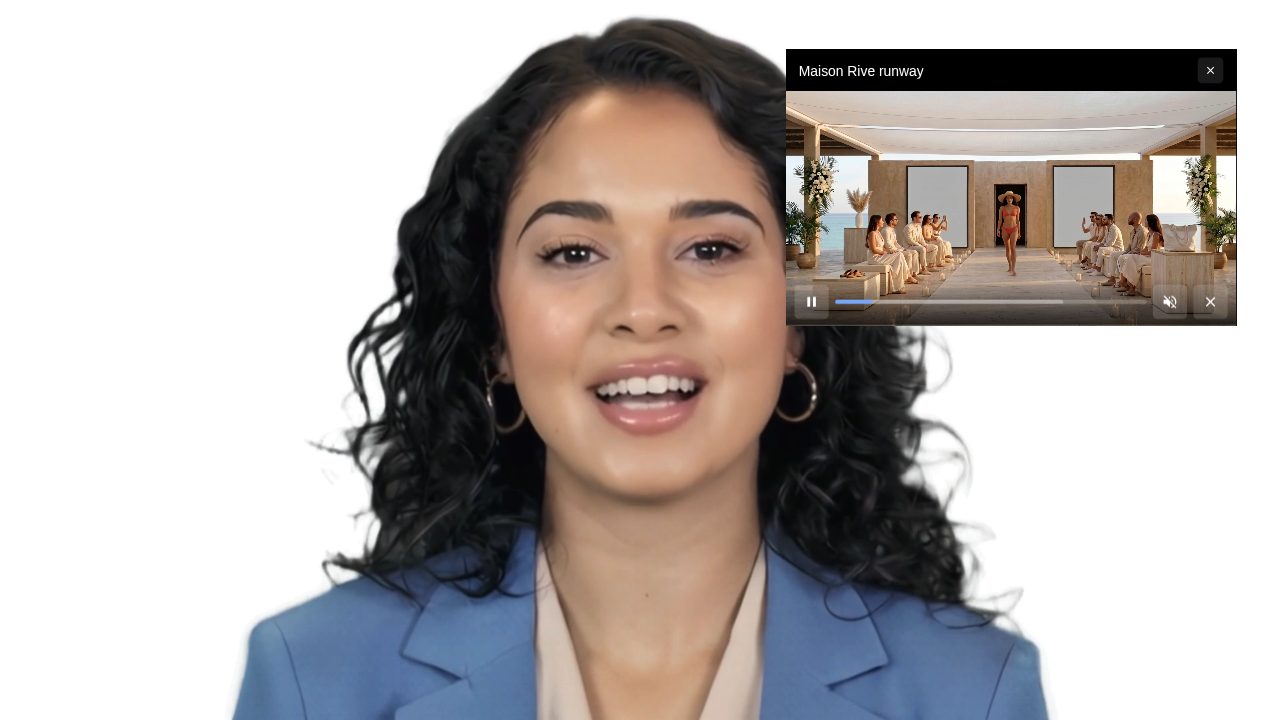
About
Plays a second video in a small window over the main one, with its own controls.
- With the main video: it can pause or mute the main video, follow it in step, or play on its own.
- The window: an optional title bar, a start and an end time, speed, loop and volume.
- When it closes: when the clip ends, when the main video plays, or after a time you set.
- The clip comes from the video's media library or from a web address.
Rules can drive it (play, pause, seek, setVolume, mute, close, restart and more) and react to it (opened, playing, ended, closed and more).
Settings
What a creator can set in the Studio, and what a host can set in its overrides.
Content
| Setting | Type | Default | What it does |
|---|---|---|---|
Video Sourcesrc | Media | - | Video URL (media:// for embedded, or external URL) |
Titletitle | Text | - | Optional title shown in the title bar |
Volumevolume | Number | 1 | Initial volume (0-1) |
End TimeendTime | Number | 0 | Stop playback at this time (0 = end of video) |
Start TimestartTime | Number | 0 | Start playback from this time (seconds) |
Playback RateplaybackRate | Number | 1 | Playback speed (1 = normal) |
Video
| Setting | Type | Default | What it does |
|---|---|---|---|
Looploop | On or off | Off | Restart when video ends |
Start Mutedmuted | On or off | Off | Begin playback muted |
Autoplayautoplay | On or off | On | Start playing automatically when shown |
Show ControlsshowControls | One of | On Hover | When to show video controls |
Styling
| Setting | Type | Default | What it does |
|---|---|---|---|
Video FitobjectFit | One of | Cover (fill, may crop) | How video fills the container |
Accent ColoraccentColor | Colour | #3b82f6 | Progress bar and accent color |
Sync
| Setting | Type | Default | What it does |
|---|---|---|---|
Sync Offset (seconds)syncOffset | Number | 0 | Time offset when syncing with main video |
Interaction
| Setting | Type | Default | What it does |
|---|---|---|---|
Click ActionclickAction | One of | Play/Pause | What happens when clicking the video |
Pause on HoverpauseOnHover | On or off | Off | Pause video when mouse hovers over it |
Behavior
| Setting | Type | Default | What it does |
|---|---|---|---|
Close Timeout (seconds)closeTimeout | Number | 0 | Auto-close after this many seconds (0 = disabled) |
Playback ModeplaybackMode | One of | Pause Main Video | How the PIP interacts with the main video |
Auto-Close TriggerscloseBehaviors | Several of | - | When should the PIP automatically close |
Events and actions
Events you can react to
| Event | When it is sent | Data |
|---|---|---|
Video Endedplugin:mp4e:pip:ended | Fired when video reaches the end |
|
Errorplugin:mp4e:pip:error | Fired when the PIP video fails to load or play; carries the browser's error message |
|
PIP Closedplugin:mp4e:pip:closed | Fired when PIP is closed |
|
Video Loadedplugin:mp4e:pip:loaded | Fired when the PIP video can play, and again after it waited for data; carries its duration in seconds |
|
PIP Openedplugin:mp4e:pip:opened | Fired when PIP becomes visible |
|
Pausedplugin:mp4e:pip:paused | Fired when the PIP video pauses; carries the time in seconds it paused at |
|
Started Playingplugin:mp4e:pip:playing | Fired when the PIP video starts or resumes playing; carries its current time in seconds |
|
Time Updateplugin:mp4e:pip:timeupdate | Fired periodically during playback |
|
Actions a rule or the host can call
| Action | What it does | Its settings |
|---|---|---|
Playplay | Start or resume playback | - |
Pausepause | Pause playback | - |
Toggle Play/PausetogglePlay | Pause the PIP video if it is playing, play it if it is paused | - |
Seekseek | Seek to a specific time |
|
Seek RelativeseekRelative | Seek forward/backward |
|
Set VolumesetVolume | Set the PIP video's volume, from 0 to 1; does not unmute it |
|
Mutemute | Mute the PIP video | - |
Unmuteunmute | Unmute the PIP video | - |
Closeclose | Close the PIP overlay | - |
Restartrestart | Restart from beginning | - |
Variables it provides
| Variable | What it holds | Type and default |
|---|---|---|
Is playing{{mp4e:pip:isPlaying}} | Whether video is currently playing. Written by Picture in Picture only. | booleanStarts as OffRead only |
Is paused{{mp4e:pip:isPaused}} | Whether video is paused. Written by Picture in Picture only. | booleanStarts as OffRead only |
Current time{{mp4e:pip:currentTime}} | Current playback time in seconds. Written by Picture in Picture only. | numberStarts as 0Read only |
Duration{{mp4e:pip:duration}} | Total video duration in seconds. Written by Picture in Picture only. | numberStarts as 0Read only |
Progress{{mp4e:pip:progress}} | Playback progress (0-1). Written by Picture in Picture only. | numberStarts as 0Read only |
Has ended{{mp4e:pip:hasEnded}} | Whether video has finished playing. Written by Picture in Picture only. | booleanStarts as OffRead only |
Is loading{{mp4e:pip:isLoading}} | Whether video is buffering. Written by Picture in Picture only. | booleanStarts as OffRead only |
What it can reach
This plugin asks for nothing: no network, no reading of the video's analysis, no say over what plays.
Versions
- v1.0.6November 29, 2026Current
What changed
1.0.6: full screen from the picture-in-picture video works: it declares the fullscreen capability (permissions.device). 1.0.5: what it reports (isPlaying, isPaused, currentTime, duration, progress, hasEnded, isLoading) is now its own read-only variables, one set per Picture in Picture, which rules read; currentTime and progress change at most four times a second. The undeclared pip_isPlaying, pip_currentTime and pip_progress are no longer written, and the retired outputs list is gone. 1.0.4: its events and actions are described. 1.0.3: closes at once on a device that plays one video at a time, rather than stop the main video. 1.0.2: stays within the player's oldest browser (no inset shorthand). 1.0.1: the first video plays once its file has loaded, not only from the second click on; no error shows while it loads. First kept as sources.
- v1.0.5November 28, 2026
What changed
1.0.5: what it reports (isPlaying, isPaused, currentTime, duration, progress, hasEnded, isLoading) is now its own read-only variables, one set per Picture in Picture, which rules read; currentTime and progress change at most four times a second. The undeclared pip_isPlaying, pip_currentTime and pip_progress are no longer written, and the retired outputs list is gone. 1.0.4: its events and actions are described. 1.0.3: closes at once on a device that plays one video at a time, rather than stop the main video. 1.0.2: stays within the player's oldest browser (no inset shorthand). 1.0.1: the first video plays once its file has loaded, not only from the second click on; no error shows while it loads. First kept as sources.
- v1.0.4November 27, 2026
What changed
1.0.4: its events and actions are described. 1.0.3: closes at once on a device that plays one video at a time, rather than stop the main video. 1.0.2: stays within the player's oldest browser (no inset shorthand). 1.0.1: the first video plays once its file has loaded, not only from the second click on; no error shows while it loads. First kept as sources.
- v1.0.3November 4, 2026
What changed
1.0.3: closes at once on a device that plays one video at a time, rather than stop the main video. 1.0.2: stays within the player's oldest browser (no inset shorthand). 1.0.1: the first video plays once its file has loaded, not only from the second click on; no error shows while it loads. First kept as sources.
- v1.0.0November 4, 2026
What changed
Archived before upgrade to v1.0.1 by seed_family.py.
- v1.0.1November 4, 2026
What changed
1.0.1: the first video plays once its file has loaded, not only from the second click on; no error shows while it loads. First kept as sources.